Menu
Home
Services
CTC Services
Internet Services
Hardware
Customer Help Center
Industry Specific
Tools
Remote
CTC Portal
Shop
About
Contact
TELEPHONE
(02) 9700 8169
Home
Services
CTC Services
Internet Services
Hardware
Customer Help Center
Industry Specific
Tools
Remote
CTC Portal
Shop
About
Contact
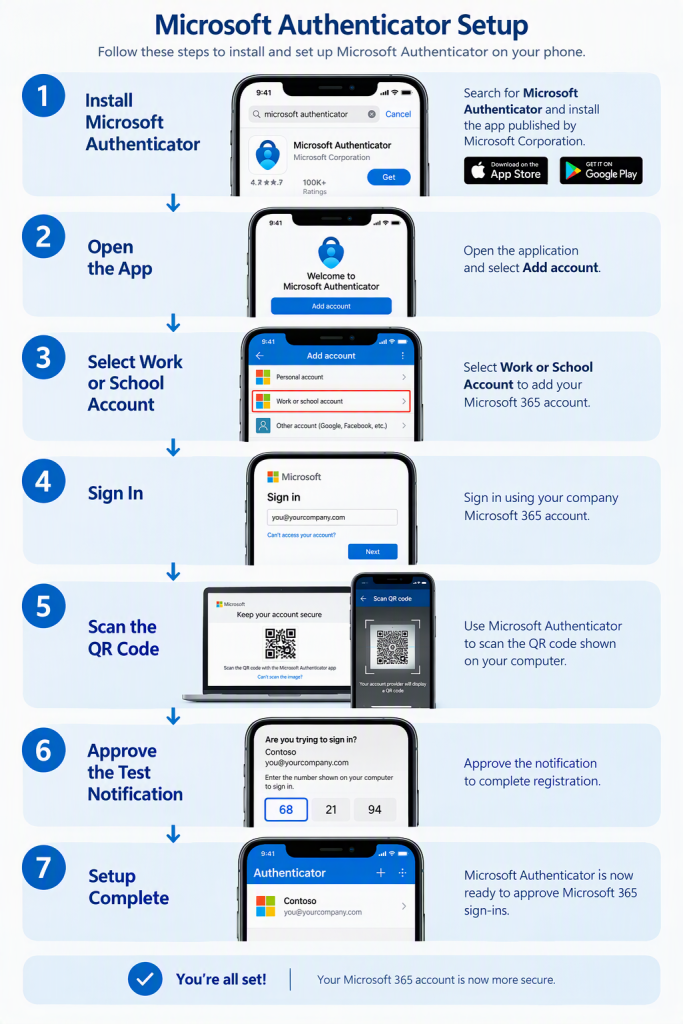
Microsoft Authenticator Setup
Before you begin, you will need:
A mobile phone.
Your Microsoft 365 Details
Internet Connection
App Store or google Play Account
Download and Install Microsoft Authenticator
Download
Microsoft Authenticator
from the Apple App Store or Google Play Store.
Microsoft Mobile Phone Authenticator | Microsoft Security
Open the App
– Launch Microsoft Authenticator on your phone.
+ to add Account – Select Work or School Account
– Choose
Work or School Account
.
Sign In
– Enter your Microsoft 365 email address and password.
https://aka.ms/MFAsetup
Scan the QR Code
– On your computer, Microsoft will display a QR Code during setup.
Approve the Test Notification
– Microsoft will send a notification to your phone.
Setup Complete
– Your account is now registered.